Reverse engineering MySQL database with Microsoft Visio
Sometimes we need to reverse engineer our database. Microsoft Visio has an option for reverse engineering. But by default it does not support MySQL or in other words you cannot reverse engineer a MySQL database. I have faced this problem and got the solution and sharing here with you.
The steps involved in this process are described below:
- Download the latest MySQL ODBC connector from MySQL site. You may find it here http://dev.mysql.com/downloads/connector/odbc/5.1.html.
- After downloading install the connector.
- Now open Microsoft Visio and open Database Model Diagram template (you may find it under Software and Database group).
- From Database menu click on Reverse Engineer. You will see the Reverse Engineer wizard.
- Click on the New button.
- Select System Data Source.
- Click Next.
- Select MySQL ODBC driver from the list.
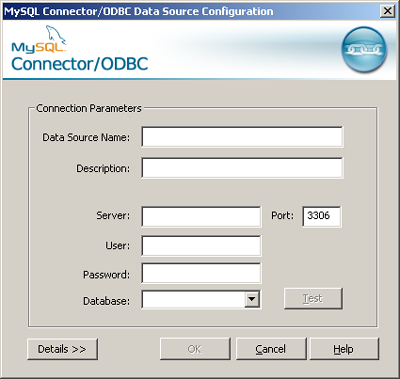
- Click Next and then Finish. MySQL Connector/ODBC Data Source Configuration window will open.
- Give a name to the datasouce, database server host, user name, password and select the database you want to reverse engineer. Remember, the list of database will be shown if you have provided correct information.
- Click on Ok. Now you will find the data source in Data Source list.
- Select the newly created data source and click Next. The regular wizard for reverse engineering will start.



By Arafat Rahman, February 12, 2009 @ 4:21 pm
WOW! I was looking for this type of solution.
Thanks a lot.
By Jilani Jidni, February 12, 2009 @ 5:24 pm
Thanks for share with us. It will help me a lot.
By Milon, February 12, 2009 @ 7:03 pm
Thank you Sajjad vai.
By Sammer, February 24, 2009 @ 12:51 pm
Thanks a lot…Its helpful..
i hva Mysql DB of nearly 100 Tables..
so how to save it. with these diagrams.
Also its showing me some primarky key errors pls help..
By Mohammad Sajjad Hossain, February 24, 2009 @ 2:08 pm
Hi Sameer,
I am sorry, but I have not understand “so how to save it. with these diagrams”. Please explain.
Can you tell me what primary key error you are getting?
By giampaolo, February 27, 2009 @ 5:04 pm
Thanks. It’s great
By jammula, July 15, 2009 @ 2:52 am
hi tried installing the connector. i successfully connected to program in VS2008 but could’nt find system data source!!! can u help???
By Mohammad Sajjad Hossain, July 15, 2009 @ 2:59 pm
Did you mean Visual Studio 2008 by VS2008? I have not used VS2008. Here I have shown how to reverse MySQL database with Microsoft Visio.
By garcon1986, November 6, 2009 @ 11:02 pm
it works, thanks a lot.
By Mishant, February 28, 2010 @ 8:15 pm
it works. thnx :).
By Sotiris, March 30, 2010 @ 9:42 pm
Good one. Thanks 🙂
By namita, May 29, 2010 @ 5:08 pm
Hi,
I followed the steps. It let me select the tables and all but after that it just keeps processing and hangs.
Please help.
By techbrainless, July 6, 2010 @ 3:29 pm
Hi … I have been stuck in the step 8 : # Select MySQL ODBC driver from the list.
because i did not find such option …
I am using visio 2003..
techbrainless
By Christoph S., January 18, 2011 @ 8:23 pm
Works like a charm! Thx.
By nick, February 18, 2011 @ 2:29 pm
WOW!!!!!! great!!! thanks a lot mate!
By Pimpmile, March 2, 2011 @ 12:07 pm
Very usefull and easy to do!
By Ashish Saxena, July 1, 2011 @ 10:58 am
Very nice tutorial.
By Vishal, July 15, 2011 @ 3:39 pm
Thanks,
I have created the visio diagram for tables,
Tables have been created successfully but, i m not getting the relationships connector between the tables.
Please, help me.
By testing, July 21, 2011 @ 7:13 pm
I followed your instructions. In step 12 which installed visio driver should I use? I’m getting the notice that the Microsoft Access driver in conjunction with the MySQL data source is perhaps not compatible. Which driver should I use? How do I get the MySQL driver?
By Junaid Atique, August 1, 2011 @ 3:34 pm
Great man great… You have solved the problem i was facing for last 3 years…
By Nadeem Arshad, December 13, 2011 @ 6:46 pm
Thanks alot its very Helpful to Me
By Abid Hussain, December 13, 2011 @ 6:55 pm
Hey,
I have just install my SQL driver but still it is not appearing in data source. When I try to add new it was not in that list as well.
By johnny5, December 29, 2011 @ 4:31 am
Thanks for the information. All the tables came over but all the columns are in Chinese? WTH
By Hendrik, January 7, 2012 @ 12:38 am
Dear all,
I saw several messages that people had trouble finding “MySQL ODBC” in step 8, and so did i.
To make a long story short, in my case that meant that i had a 64bit OS, 64bit mysql so i downloaded the 64 bit MySQL ODBC connector.
What i didn’t notice is that Visio is 32 bit, and that’s why the ODBC did not come up in the list.
If you have the same problem try to download also the 32bit ODBC and install it next to the 64 bit (this does not appear to be a problem on a 64bit os) and try again.
By Raj, January 9, 2012 @ 11:42 am
Thank you a lot 🙂
By Sheree, February 14, 2013 @ 9:39 am
@Hendrik – Thanks, I had installed the 64-bit and it wasn’t working – your tip did the trick.
By Rj, February 28, 2013 @ 3:33 am
How do I use it to connect to MySQL via SSH
By mohajer, May 13, 2013 @ 12:09 pm
i do everything you say but i cannot see my database details
and i have following warnnig:
you are using a visio ‘odbc generic driver’ driver to connect with a ‘text’ dbms datasource. by using an incompatible driver, it is possible that the catalog information retrieved will be incomplete+solution
By Joan, September 18, 2013 @ 10:49 pm
Thank you Sajjad and thank you Hendrik
By Orange, February 24, 2014 @ 6:13 am
Small important note.
Visio 2013 does not have this option.
By Hardik Manglani, March 24, 2014 @ 12:32 am
Thanks a lot that helped….
By shamshad, August 11, 2014 @ 11:21 pm
Sajjad – I am using Windows in a virtual environment (via VMsphre on mac). I can access mysql db via any tool including MySQl workbench. I have VIsion 2010 32 bit installed. I installed the mysql ODBC 32bit driver and I can now select mysql from the source. For some reason Visio is not able to connect to Mysql and only get the information schema and non of the other databases. Please advise what am I missing here?
Also, is there a way to upload the schema informaion in visio without any database connectivity (from a file that can be generated via a script)?
Thank you!
By Compuwiz, July 3, 2015 @ 4:21 am
I’ve followed steps (Thank you Hendrik for clarification) and got this error code — “can’t connect to mysql server 10060”.
I read someplace that “If you’re getting error 10060, this means that you ARE NOT ALLOWED to access the web server remotely.”
Has anyone overcame this error? How?
By Mullla, June 13, 2017 @ 10:16 pm
WOW! it sas really AWESOME. THANKS!
By Zolnerowich, March 29, 2018 @ 9:46 am
Thanks mate!